How to apply auto rules to campaigns in Dolphin {Cloud}
Updated:
⚡ In short
- Create an auto rule that works only on the campaigns you pick, not on the whole ad account
- Apply it to several campaigns at once in Dolphin {Cloud}
- Delete, enable or disable rules on campaigns in one click
A regular auto rule is applied to an ad account and checks all of its campaigns. A campaign-level rule works only on the campaigns you applied it to. The other campaigns in the ad account are left alone. This is handy when tests and working campaigns run in the same ad account and need different conditions.
For the basics of auto rules, see How to create a Facebook auto rule.
ℹ️ Plan
Auto rules are available on all plans except Light. On Light, "Auto rules management" is inactive. Plan comparison: How to choose a plan and pay for your subscription.
🎯 When you need a campaign rule
- Pause ads only in test campaigns without touching the working ones.
- Stop an expensive campaign entirely and keep the others running.
- Restart the ad sets of a specific campaign every night.
- Change budget or bid only where it is needed.
🛠️ Step 1. Create a campaign rule
- Open "Auto-rules" → the "Fb rules" tab → "Create rule".
- In "What to work with?", pick an option from the "Campaign" group. Options from the "Ad account" group create a regular ad account rule.
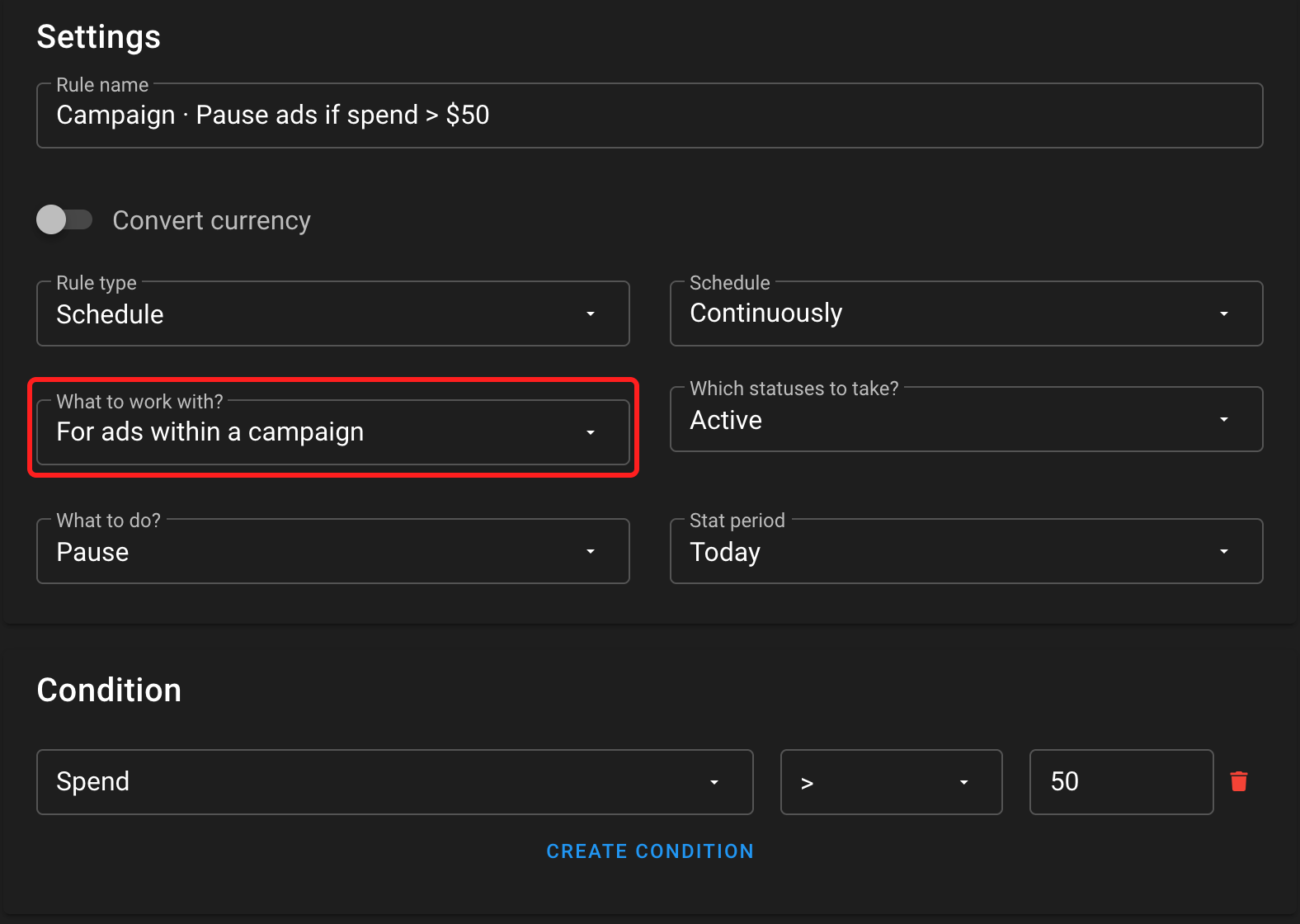
- Fill in "What to do?", "Schedule", "Stat period" and "Condition" the same way as for a regular rule.
- Save the rule.
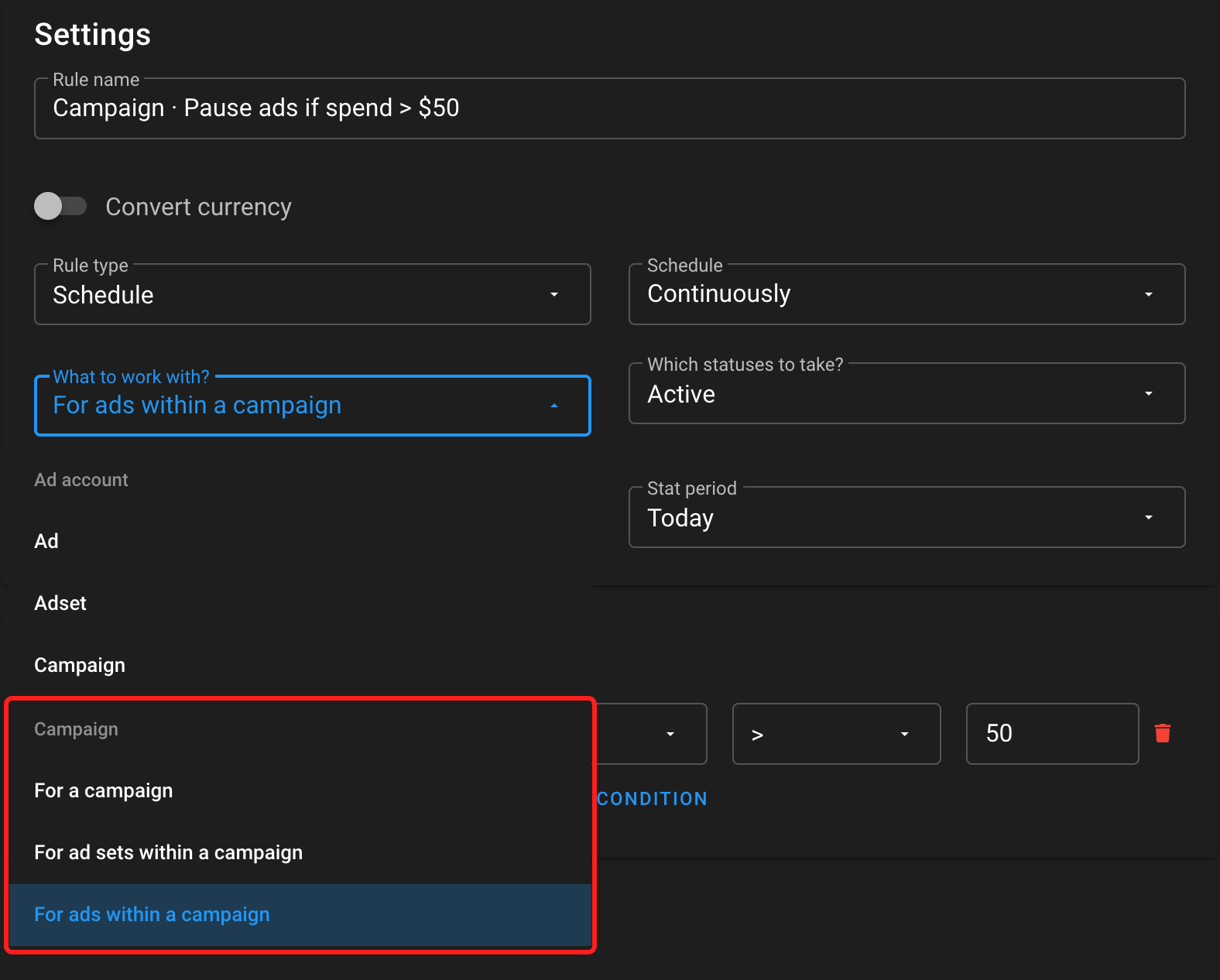
The "Campaign" group has 3 options. The option defines which actions are available in "What to do?":
| What to work with? | What the rule checks | What to do? |
|---|---|---|
| For a campaign | The campaign itself | Run, Pause, Change campaign budget |
| For ad sets within a campaign | Each ad set of the selected campaigns | Run, Pause, Change adset budget, Change bid |
| For ads within a campaign | Each ad of the selected campaigns | Run, Pause |
💡 Tip
If you choose "Change adset budget" or "Change bid", the rule switches to ad sets automatically, and "Change campaign budget" switches it to the campaign.
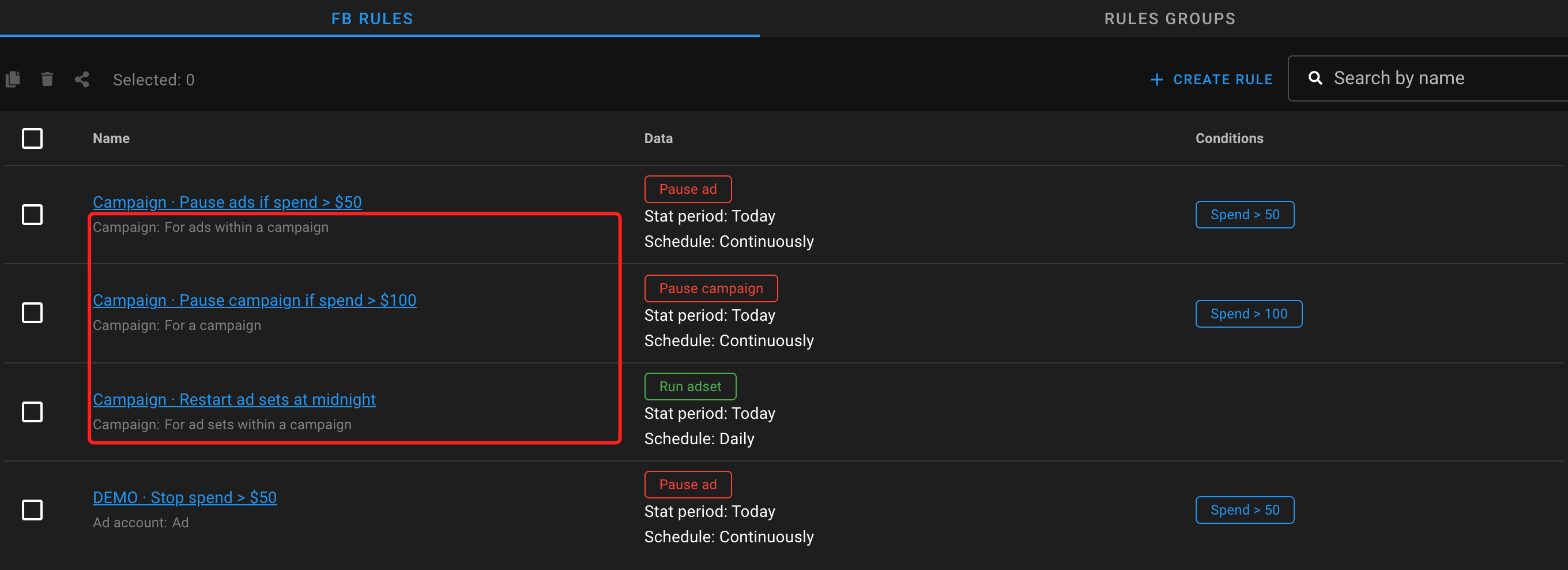
In the rules list, the line under the name shows what the rule is for: "Campaign: …" or "Ad account: …".
✅ Step 2. Select campaigns
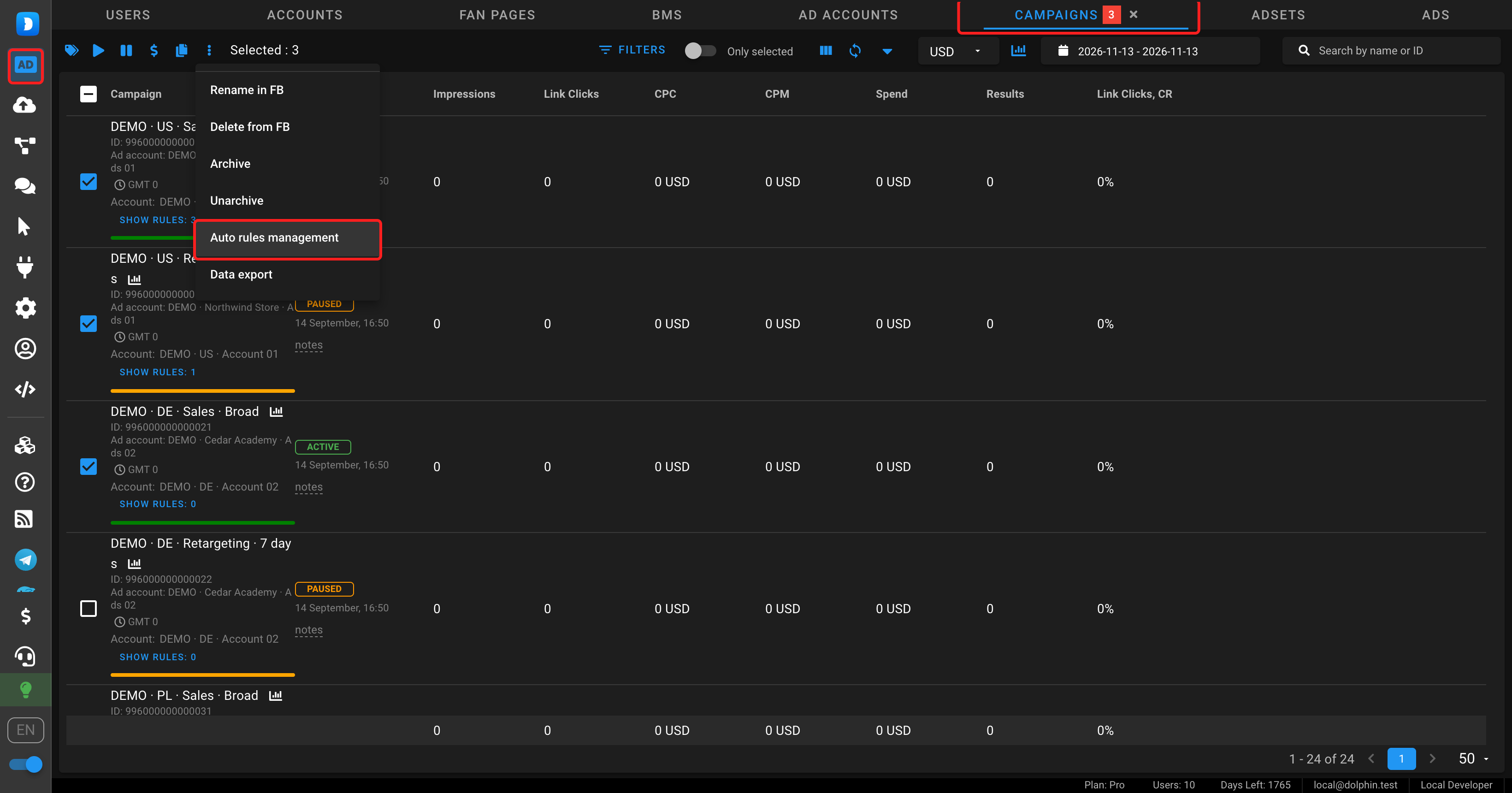
- Open Ads Manager → the "Campaigns" tab.
- Tick the campaigns you need. You can select campaigns from different ad accounts.
- Click the three dots above the table and choose "Auto rules management".
🚀 Step 3. Apply the rule
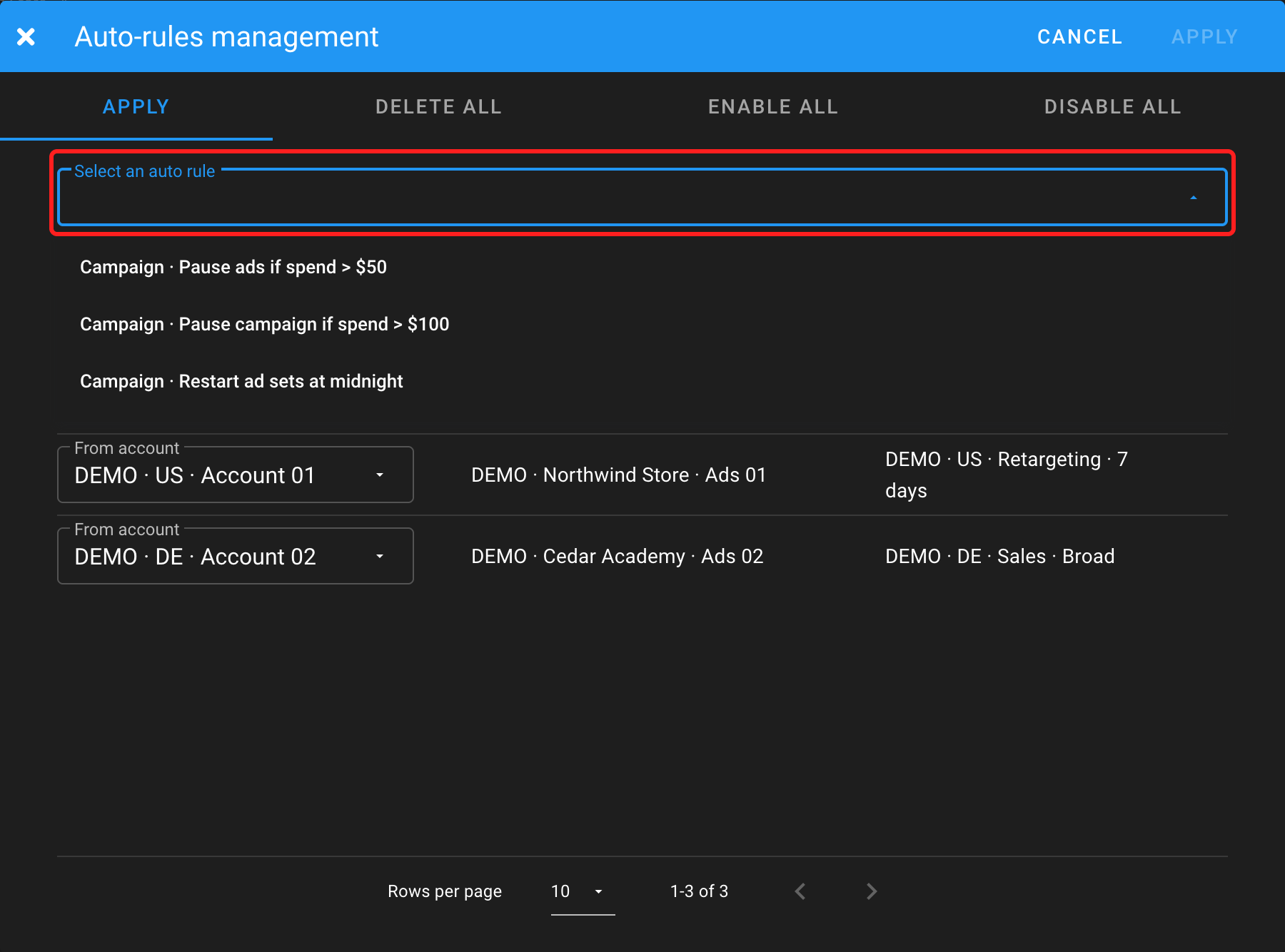
- In the "Auto-rules management" window, stay on the "Apply" tab.
- In "Select an auto rule", pick the rule. The list shows only rules created for campaigns.
- Check the "From account" column: the rule gets into the ad account through this account. The first account of the ad account is selected by default.
- Click "Apply" at the top of the window.
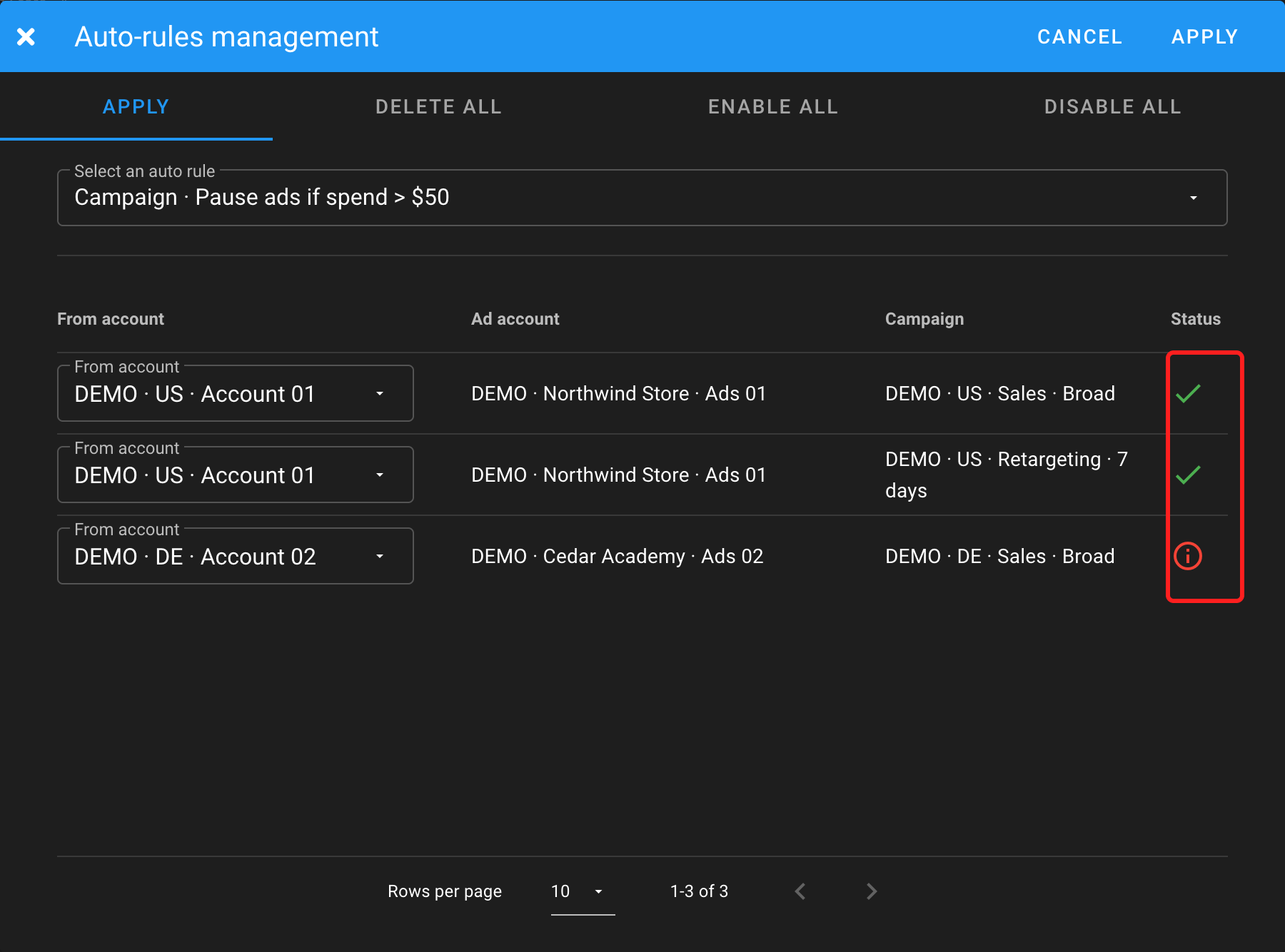
The "Status" column shows the result for each campaign: a green check if the rule was applied, or a red icon if not. Click the red icon to see the reason.
ℹ️ Good to know
One rule is applied at a time. To add another rule to the campaigns, select it and click "Apply" again.
🧹 Delete, enable or disable all rules
The same window has 3 more tabs. They work on all rules of the selected campaigns at once:
| Tab | What it does |
|---|---|
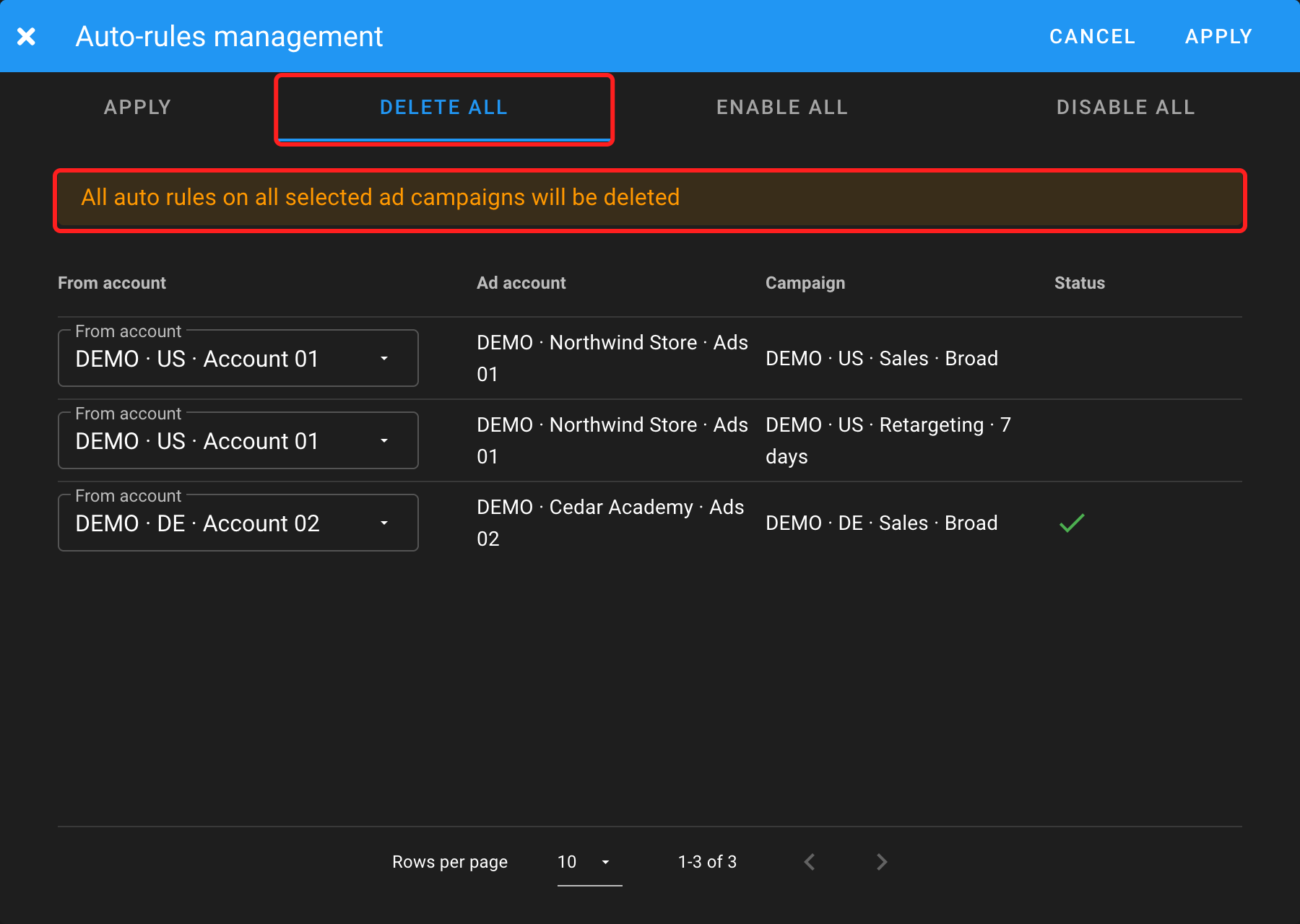
| Delete all | Deletes all auto rules on the selected campaigns |
| Enable all | Enables all disabled rules |
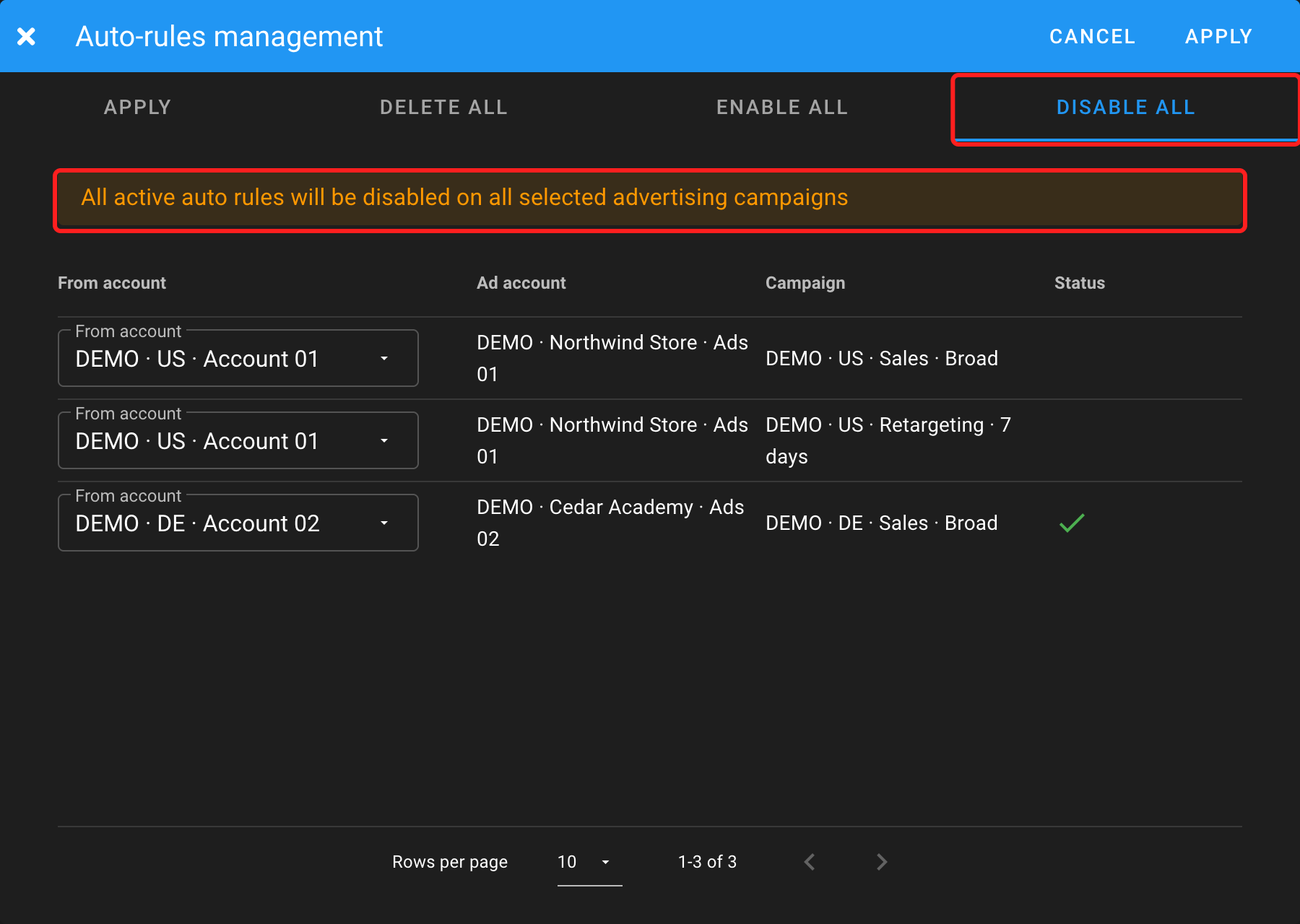
| Disable all | Disables all active rules |
- Open the tab you need and read the warning above the table.
- Click "Apply" at the top of the window.
- Wait for the checks in the "Status" column. Campaigns with nothing to change get a check right away.
🔍 Rules of a single campaign
- On the "Campaigns" tab, find the "show rules: N" button under the campaign name, where N is the number of rules.
- Click it. The "Auto rules for campaign" window opens and the rules load from Facebook in a few seconds.
- Enable, disable or delete a rule with the buttons in its row. "Enable All", "Disable All" and "Delete All" work on all rules of this campaign.
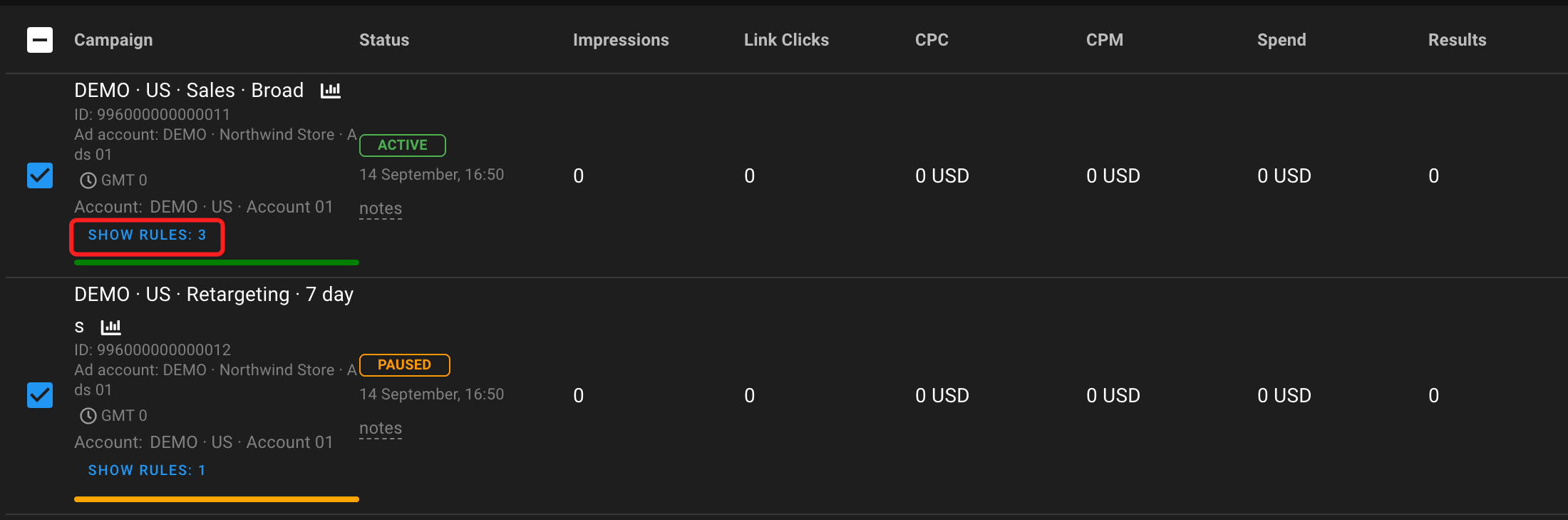
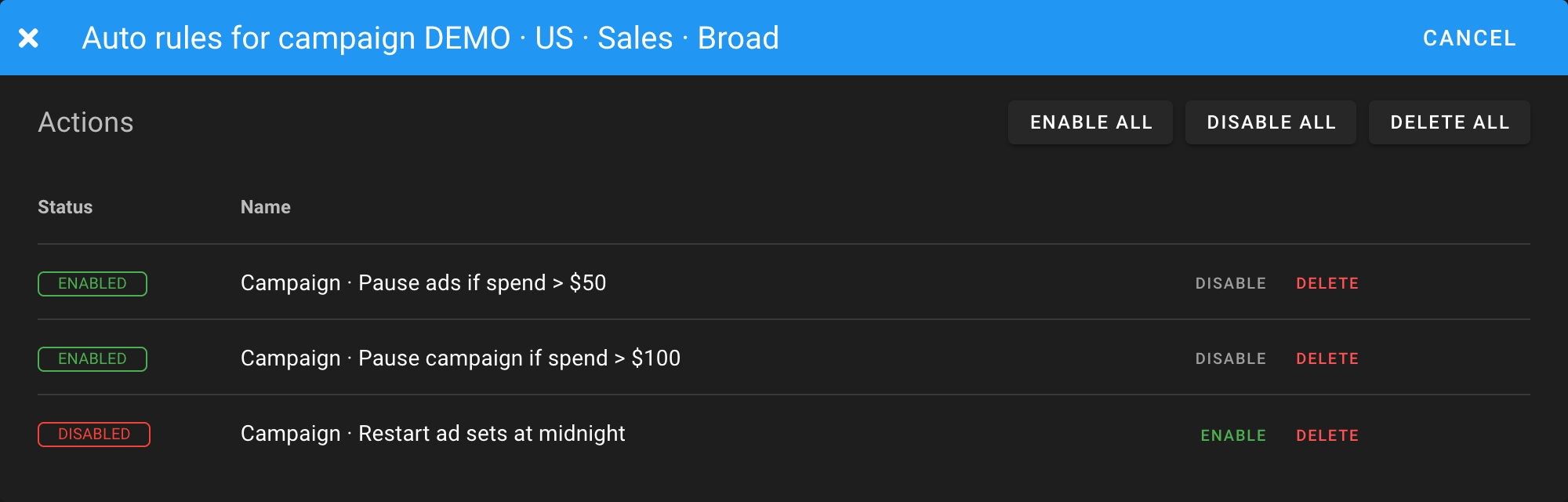
Rule statuses: ENABLED is running, DISABLED is turned off, DELETED is deleted.
⚠️ Warning
Do not apply a campaign rule via "Ad accounts" → "Apply automation rule". Such a rule is listed there too, but it will be applied to the whole ad account and will work on all of its campaigns. Apply rules from the "Campaign" group only from the "Campaigns" tab.
🧯 If the rule was not applied
- Click the red icon in the "Status" column and read the error. You can copy it with the copy button and send it to support.
- The error "Selected rule is not for Campaign level" means an ad account rule was selected. Pick a rule from the "Campaign" group or create a new one.
- A permissions error means the rule was shared with you but you have no access to it. Ask the rule owner for access.
- Check that the "From account" column shows a working account with access to the ad account, then try again.
🚫 What campaign level does not have
- Rule groups: a group can be applied only to ad accounts. Rules are applied to campaigns one by one.
- Separate rules on the "Adsets" and "Ads" tabs. To make a rule work on ad sets or ads, choose "For ad sets within a campaign" or "For ads within a campaign" and apply it from the "Campaigns" tab.
❓ FAQ
How is a campaign rule different from an ad account rule?
An ad account rule checks all campaigns in the ad account. A campaign rule works only on the campaigns you applied it to.
Can I apply one rule to campaigns from different ad accounts?
Yes. Tick campaigns from different ad accounts on the "Campaigns" tab and apply the rule via "Auto rules management".
Why is my rule missing from "Select an auto rule"?
The list shows only rules created for campaigns. Open the rule and pick an option from the "Campaign" group in "What to work with?".
How do I remove a rule from just one campaign?
Click "show rules: N" under the campaign name and delete the rule with the "Delete" button in its row.
Can I apply a rule group to campaigns?
No. Rule groups are applied only to ad accounts. Rules are applied to campaigns one by one.
Which plans support this?
All plans except Light.
📚 Read also
- 👉 How to create a Facebook auto rule
- 👉 How to group auto rules, schedule them and share them
- 👉 How to manage campaigns, ad sets and ads
🐬 Control every campaign, not just the ad account: try Dolphin {Cloud}