How to choose proxies and share them with your team
Updated:
⚡ In short
- Mobile proxies work best with Facebook, then IPv4. Take IPv6 only if there is nothing else.
- Ideal: 1 proxy per 1 account. A mobile proxy with a wide channel can carry up to 25–50 accounts.
- You can give proxies to employees with Share and the Use, Edit or Actions permissions.
- A teamlead sees their buyers' proxies, a buyer sees only their own and those shared with them.
Proxies decide how often accounts get logged out and asked for checks. Below: how to choose proxies for Dolphin {Cloud}, how many accounts to put on one proxy and how to give proxies to your team. Adding and changing proxies is covered in How to add and change proxies.
🏆 Which proxies to choose
| Place | Type | Comment |
|---|---|---|
| 🥇 | Mobile | The most stable option for Facebook. Take ones with a wide channel and unlimited traffic. |
| 🥈 | IPv4 | A good alternative if there are no mobile ones. |
| 🥉 | IPv6 | Only if there are no other options. |
- The HTTP or SOCKS protocol doesn't affect the work, choose whatever your provider gives.
- Use in Cloud the same proxy as in the antidetect browser where you work with the account. A change of IP and country leads to checks more often.
- For mobile proxies, turn on automatic IP rotation at the provider: Cloud does not change the IP by the change link.
- Before buying a large volume, test the proxies on a few accounts.
📏 How many accounts per proxy
| Option | How many accounts | When it fits |
|---|---|---|
| A separate proxy | 1 account | The best option if the budget allows |
| A mobile proxy | Up to 25–50 accounts | Wide channel and unlimited traffic |
ℹ️ How to estimate the load
Imagine you are adding the same accounts to an antidetect browser. As many accounts as you would put on one proxy there, put that many in Cloud.
👥 Who in the team sees proxies
| Role | Which proxies they see |
|---|---|
| 👑 Administrator | Proxies of all team members |
| 🧑💼 Teamlead | Their own and their buyers' proxies |
| 🎯 Buyer | Their own and those shared with them |
| 🌱 Farmer | Their own and those shared with them |
More about roles: How to add users and assign a teamlead to a buyer.
🤝 How to share proxies
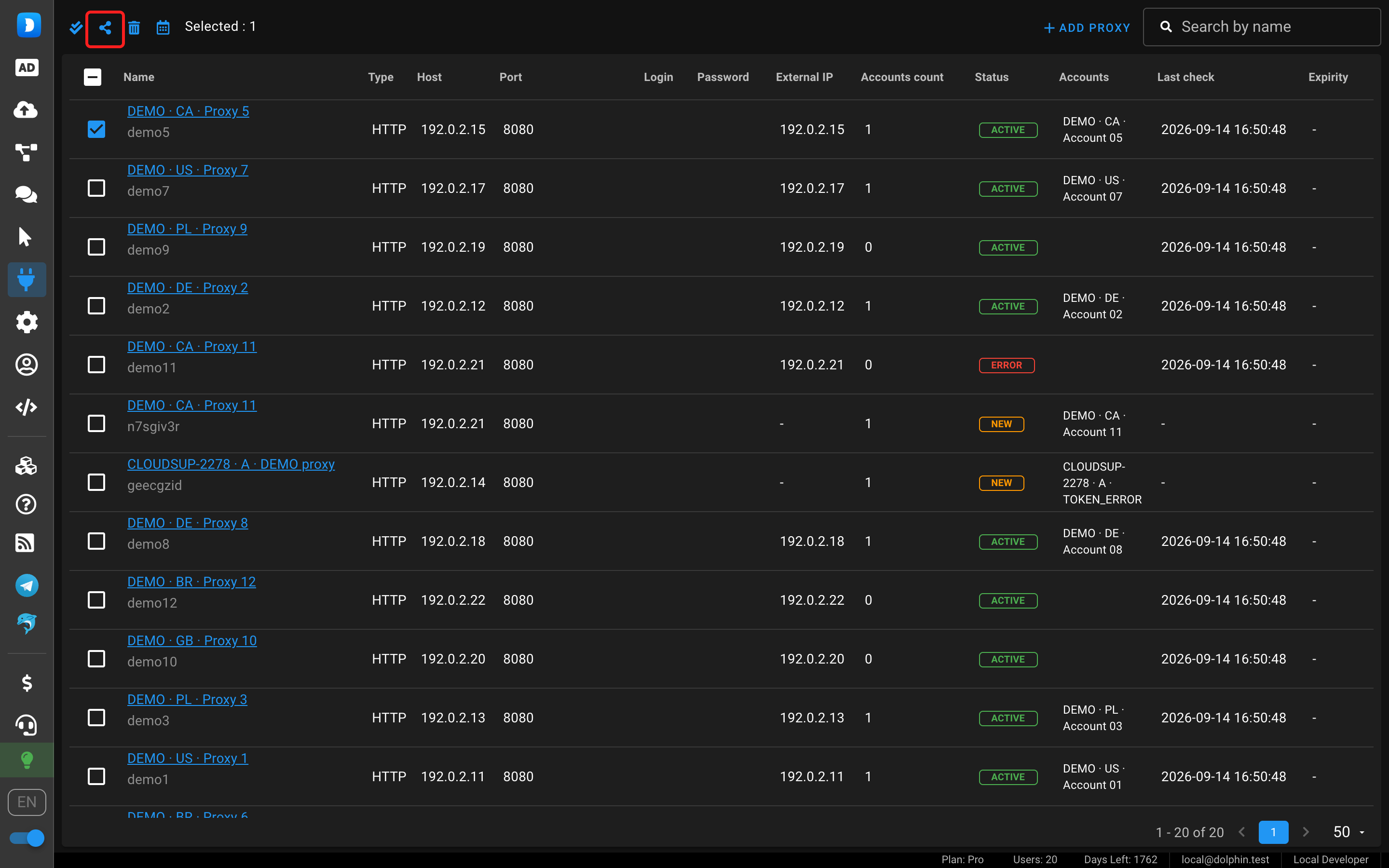
- In the left menu, open Proxy and tick the proxies you need.
- Click Share above the table.
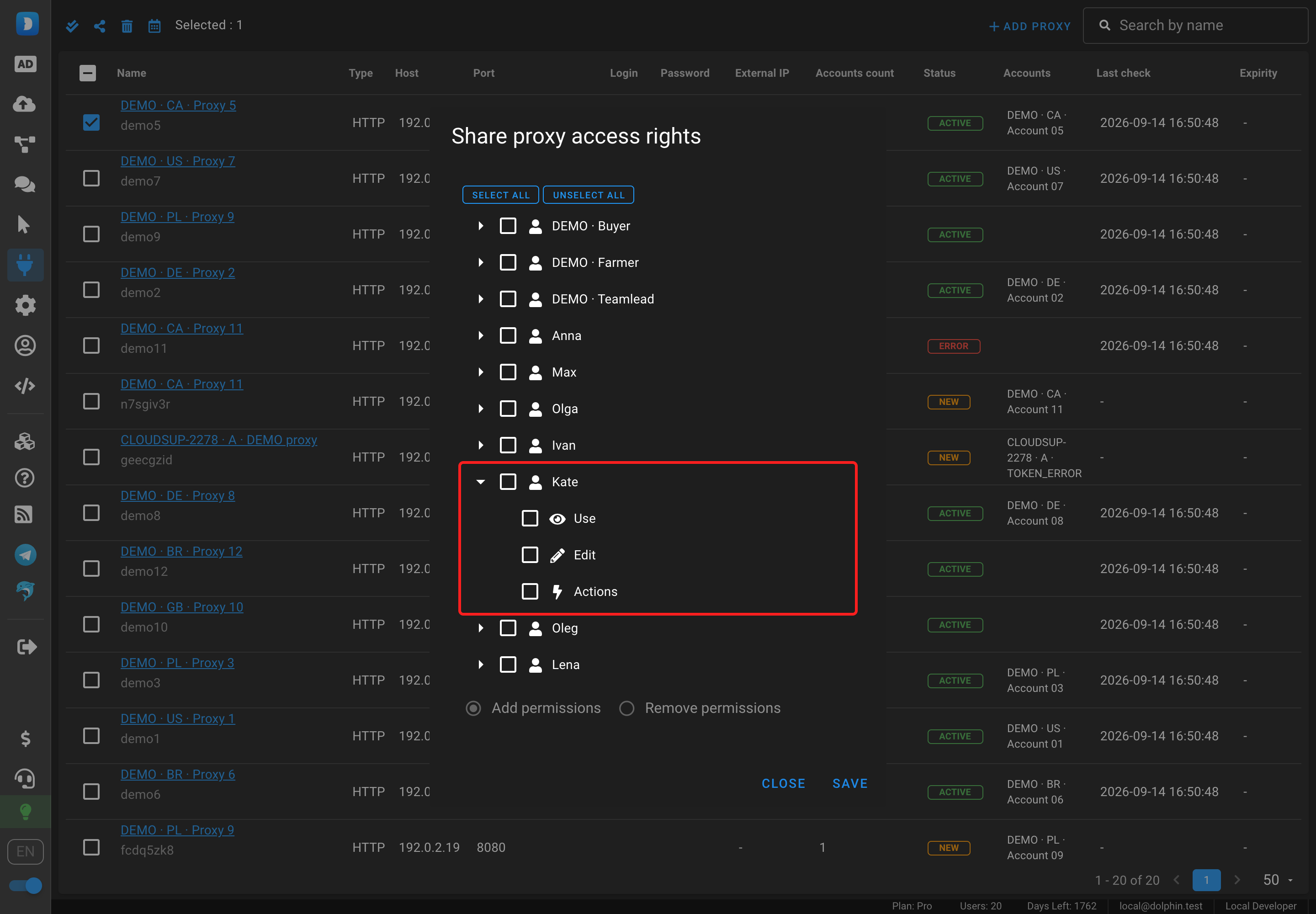
- In the Share proxy access rights window, expand an employee and tick the permissions.
- Keep the Add permissions mode and click Save. The proxies appear for the employee.
🔐 What the permissions give
| Permission | What the employee can do |
|---|---|
| ✅ Use | Sees the proxy and attaches it to their accounts. |
| ✏️ Edit | Changes the proxy data and expiry date. |
| ⚡ Actions | Everything together: use, edit, delete and share the proxy further. When you choose "Actions", the other permissions are added automatically. |
🚫 How to take access away
- Tick the proxies and click Share.
- Choose the Remove permissions mode, tick the employee and the permissions to take away.
- Click Save.
⚠️ Removing "Use"
If you remove the Use permission, the employee loses access to the proxy completely, together with the other permissions.
💡 Moving an account
When you move an account to another employee with Move accounts to another user, its proxy is copied to the recipient. You don't need to share the proxy separately.
⏰ How not to miss the end of the rental
- In the Proxy section, tick the proxy and choose Set proxy expirity date.
- Turn on Settings → Notifications → Proxy expirity is coming.
- When 4 days or less are left, the bot sends a reminder to Telegram.
🔧 Common problems
| What you see | What to do |
|---|---|
| "Proxy error" under the account status | Check the proxy in the "Proxy" section. If it works, renew the account's token |
| The account often asks for a captcha | Usually it's the proxy quality: replace it or reduce the number of accounts on it |
| The account often gets logged out | Use the same user agent and proxy as in the antidetect browser, and log in to the account by hand less often |
| An employee doesn't see a proxy shared with them | Check that they have the "Use" permission |
❓ FAQ
Which proxies does Dolphin {Cloud} support?
HTTP, SOCKS4 and SOCKS5, with or without login and password.
How many accounts can I put on one proxy?
Better 1 account per 1 proxy. On a mobile proxy with a wide channel, up to 25–50 accounts.
Does Dolphin {Cloud} change the IP by the change link?
No. Use proxies with automatic IP rotation.
Who can I give a proxy to?
Any member of your team. The Share proxy access rights window shows all team members except you and the owner of the selected proxies. This applies to a teamlead too: they can share a proxy with another teamlead's buyer.
🧭 What's next
- 🌐 How to add and change proxies
- 🤝 How to give an employee access to accounts
- 💳 How to choose a plan and pay for a subscription
🐬 Run ads on stable proxies. Try Dolphin {Cloud}