How to create ad copies inside an ad set
Updated:
⚡ In short
- Set how many identical ads to create from one ad, right during the launch.
- Set the number for the whole launch, for an ad account or for a single ad.
- Understand how many ads each ad set will get.
- Build a 1-10-10 scheme without duplicating ads by hand.
Since November 2026 Dolphin {Cloud} creates copies of an ad inside the ad set right during the launch. Before, identical ads had to be duplicated by hand after the launch. Now you set the number of instances, and each ad set gets that many identical ads with the same creative, texts and link.
The number is set on the «Creatives» step of the launch wizard («Upload bundle»). The original ad counts toward this number: 10 means 10 ads, not the original plus 10 copies.
🔢 How to set the number for the whole launch
Open the launch and go to the «Creatives» step.
In the top panel, enter a whole number from 1 to 200 in the «Ad instances» field. The default is 1, which means no copies.

This is the global value. All ad accounts and ads without their own value use it.
The «Apply to the entire upload» button resets the custom values of all ad accounts and ads, and the whole launch goes back to the global value.
🗂️ How to set the number for an ad account
Each ad account header has an «Each ad × N» button, where N is how many instances each ad of this account gets. Next to it is the «Total ads» counter: the sum of instances of all ads in this ad account.

Click «Each ad × N». The «Copies of each ad» window opens.
Choose a mode:
- Use global value: the ad account takes the number from the «Ad instances» field and changes with it;
- Custom value: the ad account has its own number. Type it in or use «−» and «+».
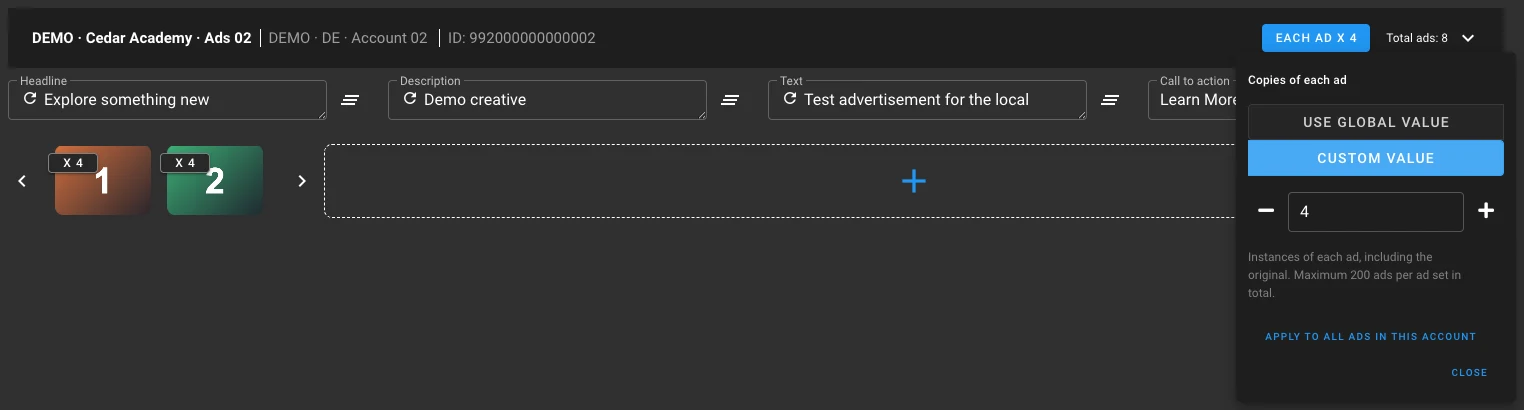
If some ads in the account already have their own number and you want to align them, click «Apply to all ads in this account». All ads of the account switch to the account value.
When an ad account has its own value, the «Each ad × N» button is highlighted in blue.
🖼️ How to set the number for a single ad
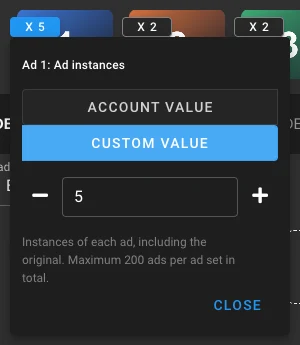
Each ad has a «× N» badge in the corner.
Click the badge. The «Ad N: Ad instances» window opens.
Choose «Account value» so that the ad takes the account number, or «Custom value» to set its own.
ℹ️ Which value wins
The ad value is used first, if it is set. If not, the ad account value. If there is none, the global value of the launch. When you change the global value, the custom values of ad accounts and ads are not reset.
Copies work in the regular mode, in Flex, in Carousel and in «Languages» mode. In Flex, Carousel and «Languages» the number applies to the whole ad: the full set of creatives, the whole carousel or the ad with all its languages is copied. Launches to catalogs do not create copies.
🧮 How many ads each ad set gets
Before distributing ads across ad sets, Dolphin {Cloud} expands the list: each ad is repeated as many times as it has instances. Then this list is distributed according to the «Ad → Adset» setting.
- All → All: each ad set gets the whole expanded list. In this mode the «Total ads» counter shows how many ads each ad set will have.
- X → 1: each ad set takes X ads from the expanded list in order. When the list ends, distribution starts over. X counts ads including copies.
💡 Example
An ad account has 3 creatives: the first is set to × 3, the other two to × 2. The expanded list is 1, 1, 1, 2, 2, 3, 3, 7 ads in total.
With «All → All» and 2 ad sets, each ad set gets 7 ads, 14 in the ad account.
With «X → 1», X = 2 and 3 ad sets: the 1st ad set gets 1 and 1, the 2nd gets 1 and 2, the 3rd gets 2 and 3.
📋 How to build a 1-10-10 scheme
The 1-10-10 scheme is 1 campaign with 10 ad sets and 10 identical ads in each.
On the «Settings» step, keep «Campaigns quantity» at 1.
On the «Creatives» step, set «Number of ad sets» to 10 and upload 1 creative to the ad account.
Enter 10 in the «Ad instances» field.
Keep the «All → All» distribution and click «Create».
Each ad account gets 10 ad sets with 10 ads each. You don't need to duplicate anything by hand after the launch.
⚠️ Limits
⚠️ Important
- Each field accepts a whole number from 1 to 200. With any other value the field is highlighted with «Whole number from 1 to 200», and when you leave the field the value goes back to 1.
- The sum of instances of all ads in an ad account cannot exceed 200. If it does, «Check quantity» appears instead of the counter, and in the regular mode the «Create» button stays inactive until you lower the numbers.
- Copies are identical: the same creative, texts, link and settings. Facebook treats each copy as a separate ad.

📚 See also
- 👉 How to upload creatives and distribute them across ad sets
- 👉 How to run your first launch in Dolphin {Cloud}
- 👉 How to launch a Flexible ad
🐬 New to Dolphin {Cloud}? Try it free for 3 days.