How to get an EAAB token and a BM token for Dolphin {Cloud}
Updated:
⚡ In short
- Usually you don't need a token by hand: if you paste cookies, Dolphin {Cloud} gets the EAAB token itself.
- To get EAAB manually, take it from the page source of Ads Manager: it starts with
EAAB. - The BM token starts with
EAAG. Cloud gets it itself when you add an account, so there is no need and no place to enter it by hand. - Temporary tokens of other kinds from sellers do not work.
A token is the key Dolphin {Cloud} uses to work with a Facebook account. In most cases you don't need to look for it: cookies are enough. Below: when you still need a token, how to get it and where to paste it, and what to do about a BM token error.
🧭 Which token you need and when
| Token | What it looks like | When you need it |
|---|---|---|
| 🔑 EAAB token | EAAB… | Adding an account without cookies, or when Cloud says it could not get the token from cookies automatically. |
| 🏢 BM token | EAAG… | Sharing ad accounts to a BM and BM domain management. Cloud gets it from cookies itself when you add the account. |
| ⚙️ System token | Issued in Business Manager | Working through the official API without cookies. See How to add Facebook accounts. |
ℹ️ Try cookies first
If you have the account's cookies, paste them into the Cookies field and leave the token field empty. Cloud gets the token itself, and you don't have to search the page source.
🔑 How to get an EAAB token manually
- Open the browser profile where the account is logged in and go to
https://www.facebook.com/adsmanager/manage/campaigns/. - Open the page source: Ctrl+U on Windows or Cmd+Option+U on macOS. You can also right-click and choose "View page source".
- Press Ctrl+F or Cmd+F and search for
EAAB. - Copy everything inside the quotes, starting with
EAAB. That is the token: a long string of Latin letters and digits without spaces.
⚠️ A token is access to the account
With the token, anyone can manage the account's ads. Don't send it to public chats and don't publish screenshots where it is visible. If the token got into the wrong hands, log out of the Facebook account on all devices and take new cookies.
⚠️ Tokens from sellers
Some sellers give accounts with a ready-made token. Check what it starts with. Cloud needs an EAAB token, which you get from Ads Manager. Tokens of other kinds, for example EAAI…, are temporary and stop working after you log out of the account.
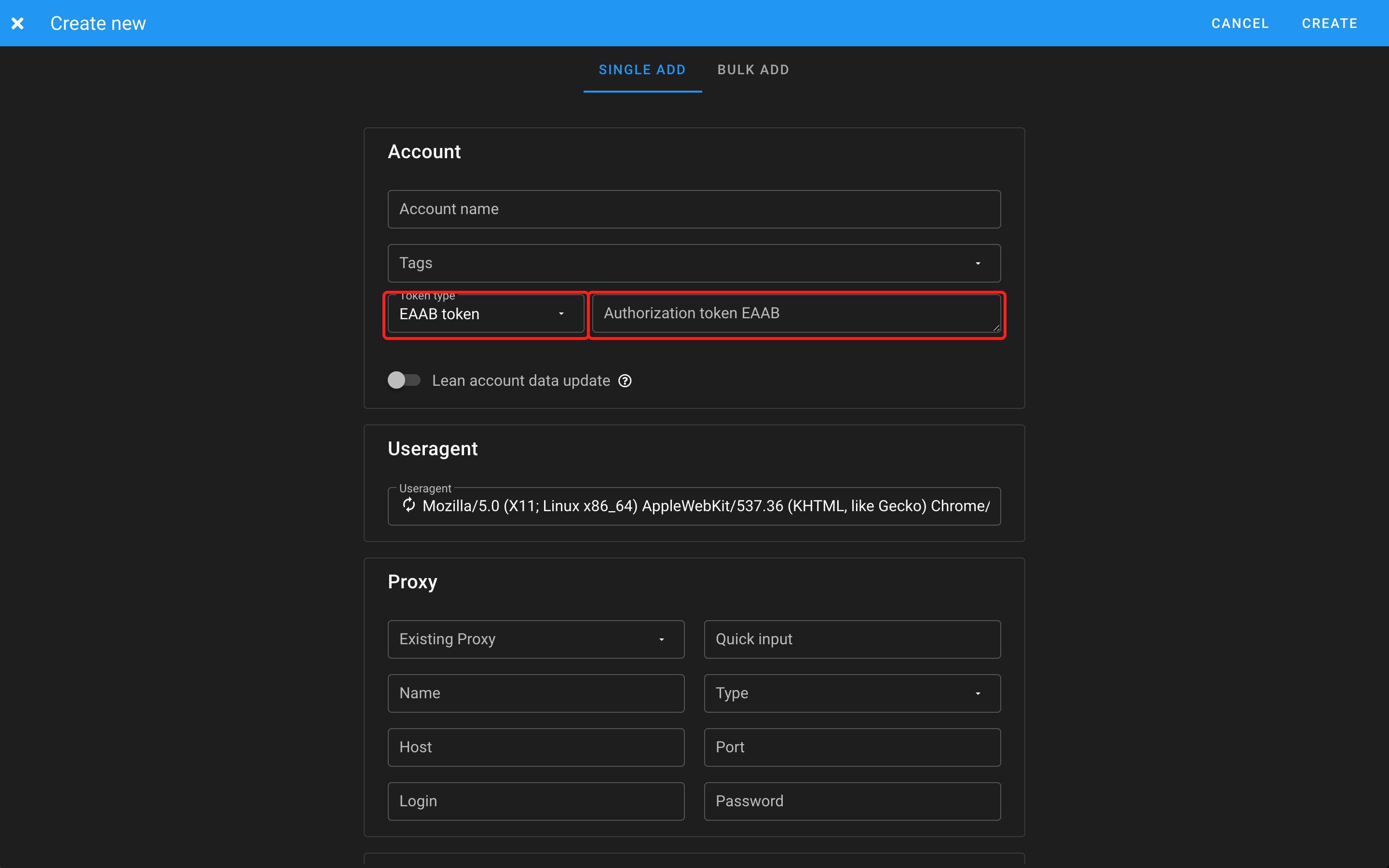
📥 Where to paste the EAAB token
- Open Ads Manager → Accounts → Add account, or click the name of an account you already added.
- In the Token type field, choose EAAB token.
- Paste the token into the field next to it.
- Click Create for a new account or Edit for an existing one.
- For an existing account, tick it in the table and click the Check tokens icon above the table so Cloud checks the new token.
🏢 BM token (EAAG)
Cloud needs the Business Manager token to share ad accounts to a BM and to manage domains. You don't have to enter it: when you add an account with cookies, Cloud opens the account's Business Manager itself and saves the token. There is no separate BM token field, neither in the account window nor in the ad account sharing windows.
For Cloud to get the BM token, three things must be true when you add the account:
- The cookies are fresh: the account is logged in and the cookies contain
c_user. - The account already has a Business Manager.
- If the Business Manager asks for a 2FA code, the account has its 2FA key saved in the 2FA field.
🆘 The "Invalid access token" error
You can see it in the Share personal ad account to BM, Share ad account BM to BM and Domain management windows if Cloud could not get the BM token for this account. Next to it there may be a hint to add the BM token in the account editing dialog and a link on how to get the BM token. The account window no longer has a field for this token, so there is nowhere to paste it by hand.
- Check in the browser that the account has a Business Manager and that it opens.
- If the Business Manager asks for 2FA, save the 2FA key in the account window.
- Take fresh cookies and paste them into the account window. How: How to get Facebook account cookies.
- If the error is still there, contact support and give the account name.
🆘 Common errors
| What you see | Why | What to do |
|---|---|---|
| The token field is red when creating an account | "EAAB token" is selected, but there are no cookies | Paste cookies or a token |
| Cloud could not get the token from cookies automatically | The cookies are outdated | Fresh cookies or a token by hand |
| ERROR status after pasting a token | The token is temporary or the account was logged out | Take the EAAB token again from Ads Manager |
| "Invalid access token" in an ad account sharing or domain window | Cloud did not get the BM token when the account was added | Check the BM, the 2FA key and the cookies, then contact support |
❓ FAQ
The token stopped working. Do I need to find a new one?
It is easier to update the cookies and choose ⋮ → Renew token: Cloud gets a new token itself. If the account has its login, password and 2FA saved, Cloud can log in again with the Try to log in icon.
Can I work with a token only, without cookies?
Some features work, but stable work needs cookies. Without them the account may get the "Cookies required" label.
Where do I paste a BM token if I already got it?
Nowhere: there is no BM token field. Cloud gets it from cookies itself when you add the account.
How is a BM token different from a system token?
Cloud gets the BM token (EAAG) itself and uses it for certain BM operations. You issue a system token yourself for a system user, and it replaces cookies when working through the official API.
🧭 What's next
- 🍪 How to get Facebook account cookies
- ➕ How to add Facebook accounts
- 🏢 How to work with BMs in Ads Manager
🐬 Got the token? Time to add accounts. Go to Dolphin {Cloud}