How to set up Facebook data sync
Updated:
⚡ In short
- Turn on general data sync from Facebook.
- Split sync into blocks and give each its own interval.
- Work out the interval for mobile proxies.
- Exclude an account from auto-update with a tag.
- Understand which tasks run before the update.
Dolphin {Cloud} updates Facebook data by itself: accounts, ad accounts, campaigns, ad sets, ads, billing and statistics. Sync is set up in «Settings» on the «FB Data Update» tab, in the «Data update» block. There are 2 modes: general sync with one interval, or split sync where each data type has its own frequency.
⚙️ How to turn on general sync
Open «Settings» → «FB Data Update».
Turn on «Automatically sync data».
Enter an interval from 30 to 2000 minutes in the minutes field and click «Save».
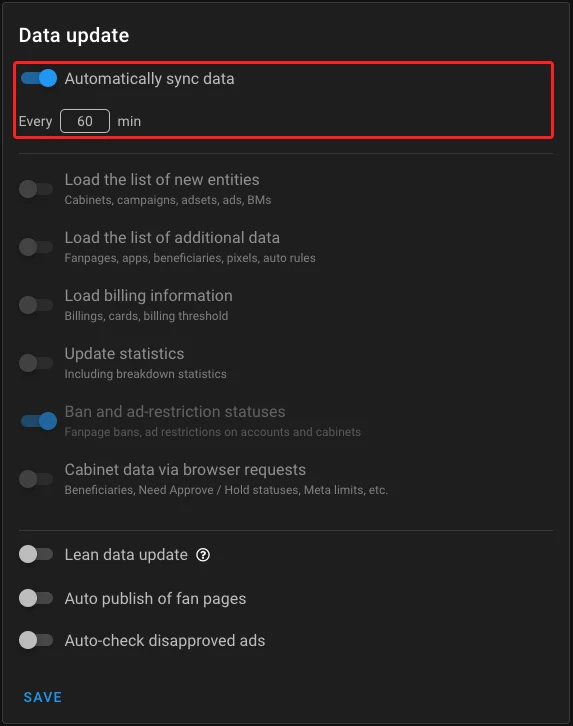
In this mode all data is updated together, at one frequency. The split sync blocks below are unavailable while general sync is on.
🧩 How to set up split sync
Since October 2026 sync can be split into blocks. This helps when, for example, you need statistics often, while the list of FPs and pixels can be updated less often: what matters is updated faster, and accounts and proxies don't get extra load.
Turn off «Automatically sync data». The blocks below become active.
Turn on the blocks you need and set the interval in minutes for each:
- Load the list of new entities: ad accounts, campaigns, ad sets, ads, BMs;
- Load the list of additional data: fanpages, apps, beneficiaries, pixels, auto rules;
- Load billing information: billings, cards, billing threshold;
- Update statistics: including breakdown statistics;
- Ban and ad-restriction statuses: fanpage bans, ad restrictions on accounts and ad accounts. This block has no interval, you can only turn it on or off;
- Cabinet data via browser requests: beneficiaries, Need Approve and Hold statuses, Meta limits and more.
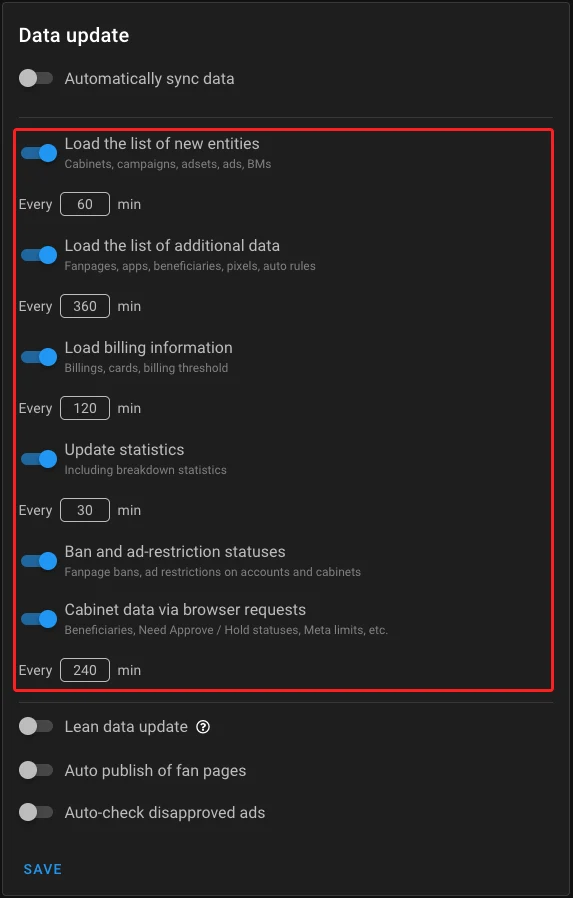
Click «Save».
A block that is turned off is not updated automatically. So that requests to Facebook don't all go at once, Dolphin {Cloud} adds a random 1 to 5 minutes to each interval.
⚠️ Important
Each interval must be from 30 to 2000 minutes. If you enter less or more, «Min 30» or «Max 2000» appears under the field and the settings are not saved.
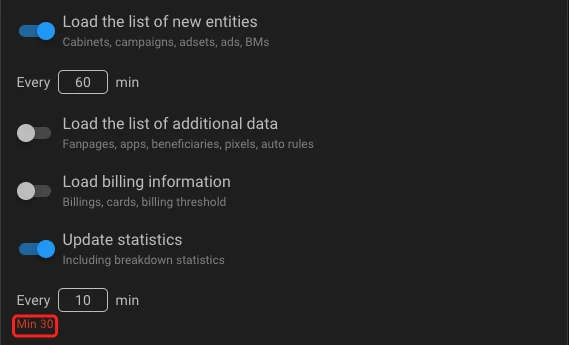
ℹ️ After the update
Your previous settings did not change. If general sync was on, it works as before. If it was off, the new blocks are off too until you turn them on.
🧮 Which interval to choose for mobile proxies
Take the maximum number of accounts on 1 mobile proxy. For example, you have 2 mobile proxies: 15 accounts on one and 60 on the other. You take 60.
Calculate the interval with the formula 0.6*(number of accounts) and add a pause for the IP change. If you get less than 30 minutes, set 30: that is the minimum.
💡 Example
60 accounts on 1 mobile proxy: 0.6*60=36, that is 36 minutes plus a pause for the IP change. With split sync, use this number for the most frequent block, usually «Update statistics».
If the interval is too short, Dolphin {Cloud} won't manage to update all accounts before the next run: some data stays outdated and the proxies get extra load. Also, Facebook updates statistics no more often than once every 15 minutes.
ℹ️ Good to know
Server proxies don't need an IP change, so you don't need to add a pause for it.
🏷️ How to turn off auto-update for an account
If an account should not be updated automatically, add the tag «не-обновлять» to it. The tag name must be exactly this, in Russian, in any interface language.
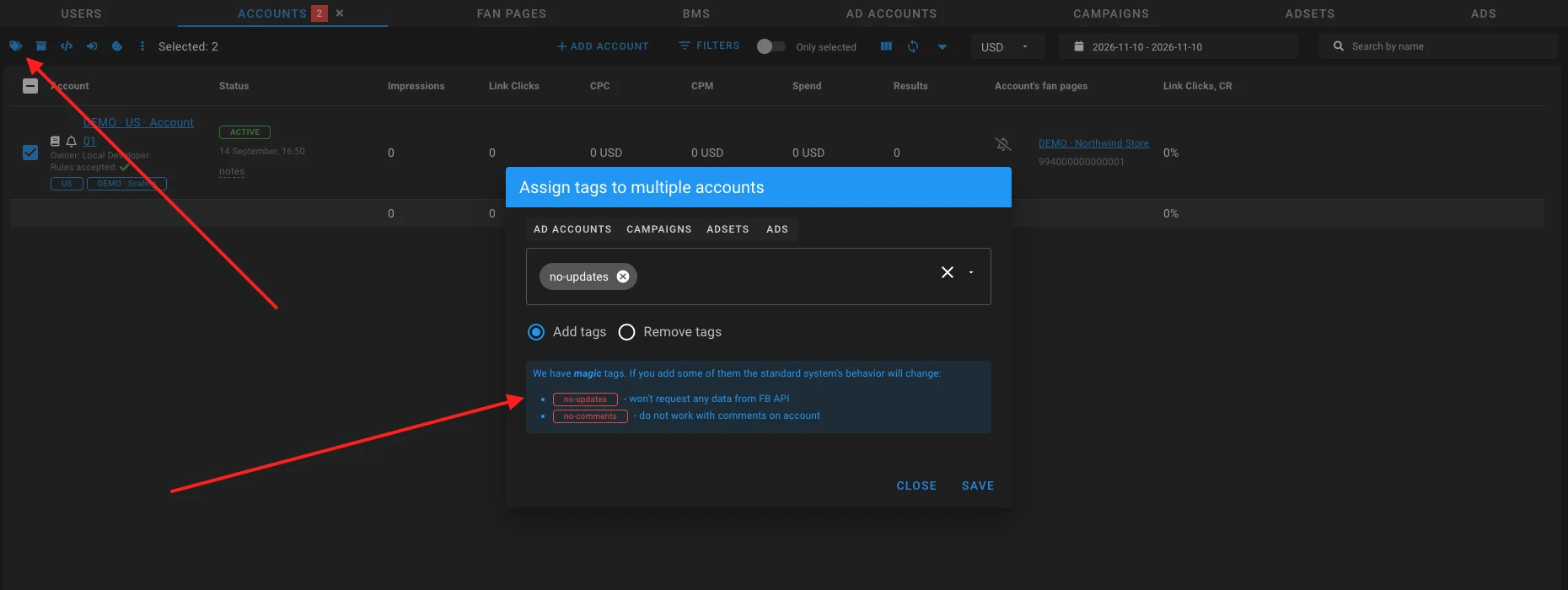
🚦 Task priority
⚠️ Important
Actions you start manually always run before the automatic update.
- Manual actions. If an auto-update is running and you need to perform an action (create an FP or attach a pixel), your action runs first. The update continues right after it.
- Ads creation. It also has priority over data updates: the launch finishes first, and only then the update resumes.
📚 See also
- 👉 How to set up Dolphin {Cloud} before you start
- 👉 How to set up statistics and what to do if they do not update
🐬 Want to try it yourself? Open Dolphin {Cloud}