How to send costs to Keitaro
Updated:
⚡ In short
- Understand how Dolphin sends costs to Keitaro.
- Set up passing the ad ID to Keitaro sub_id_1.
- Fill in the export settings in Dolphin.
- Find the cause if costs are not passed.
ℹ️ Plan
Cost export is not available on the Light and Start plans.
🧠 How does the export work?
Dolphin knows which ads, adsets and campaigns exist, and how much each of them has spent over its whole run, broken down by day.
Every ad, adset and campaign has a unique ID. This makes any Facebook Ads object easy to tell apart from the others.
If Keitaro knows the ID of the ad that got the click, all Dolphin has to do is tell Keitaro via its API:
The ad with ID = X had spend = Y in currency Z on 2020-02-06
Let's go through X, Y and Z:
- Z (currency): Dolphin knows the currency of the ad account the ad belongs to and inserts the right ISO code. If it isn't Keitaro's base currency (for example, the tracker uses rubles and the FB ad account uses euros), the tracker converts it itself.
- Y (spend): Dolphin knows the ad's spend for every day, so it builds the daily cost breakdown itself and passes it to Keitaro.
- X (ad ID): the most interesting part! Read about it below.
⚙️ Setting up traffic in Keitaro
In very simple terms
ℹ️ Good to know
Set up your FB ad link so that your ad IDs arrive in one of Keitaro's sub_id parameters.
In more detail
🏷️ Subid in Keitaro
Subids in Keitaro are tags, parameters in the address bar that carry extra information about ad clicks.
For example, your landing page is at http://landing.ru. You run FB traffic from two adsets: one targets men, the other targets women. For analytics, you want to see stats by gender separately. So you add to the link:
- http://landing.ru/?sub_id_1=male for the men's adset;
- http://landing.ru/?sub_id_1=female for the women's adset.
This way the ?sub_id_1=female tail passes extra information about the visitor's gender to the tracker. Keep this idea in mind!
🆔 Ad ID in Facebook
Now it's clear how to pass the ad ID to the tracker: add ?sub_id_1=<ID> to your ad links. The second question: where do you get the ad ID?
It's simple. Facebook has a special macro that inserts the ID of the specific ad being shown at that moment. The macro looks like this:
{{ad.id}}
By the way, FB has a lot of macros.
The puzzle comes together. Combining the Subid and the ad_id macro, we get the piece to add to the FB ad link:
?sub_id_1={{ad.id}}
✅ Check
Now check that everything works. Hopefully you have launched a couple of ad accounts with the new ad link, and Keitaro has already received some traffic from it.
Go to Reports → Clicks.
Click the time of a click that came through the new link.
A card with the click details opens.
Scroll down to the Subid section.
Check whether the ad ID arrived in the sub_id_1 field.
If you see a real ad ID, the hardest part is over. If it is still empty, use the life hack below.
💬 Keitaro support
You're a media buyer, not a dishwasher programmer. You may well get lost in integrations and fail to pass the ad ID to Keitaro sub_id_1.
In that case, send Keitaro support this message:
Hello! I run traffic from FB and use your tracker. I need to pass the FB macro {{ad.id}} to the tracker's sub_id_1 parameter. What should I change in my integration to do this?
We think this helps in 90% of cases. If things still don't move, read on.
🐬 Dolphin support
Dolphin is first of all a tool that helps you take the right actions and get effective results. Every media buyer's integrations are very different: some use domain parking, some use an API integration on their own servers, others use Shopify.
⚠️ Warning
There is no universal integration solution. Setting up the integration of your promo materials with Keitaro for cost export is outside the scope of regular Dolphin support. In fact, this task is not directly related to Dolphin at all.
🛠️ Setting up Dolphin
💡 What else is in the settings
Export frequency: every 25, 30, 45 or 60 minutes. You can choose which ID is in the link: ad, ad set, campaign or ad account. “Pause between requests” is set in milliseconds, up to 2000.
🔗 Tracker URL
Just copy the link from the browser's address bar.
💡 Tip
Sometimes you need to enter the URL without admin/: it can get in the way of passing costs.
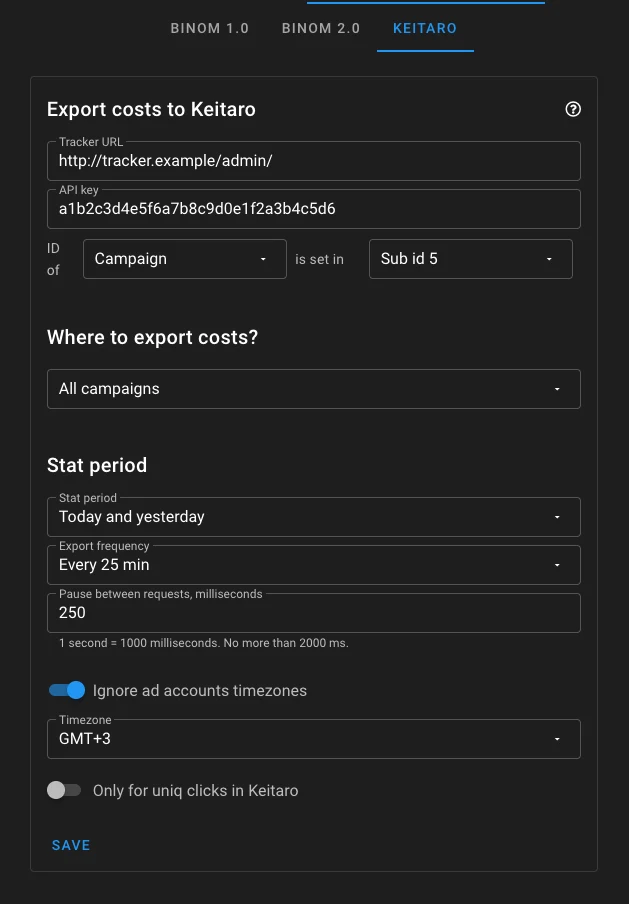
🔑 API key
⚠️ Warning
Keitaro must be the Expert version. Cheaper plans do not support cost export.
To get the API key:
Click your login in the top right corner.
Select Profile.
Go to the API keys tab.
Get the key =)
🎯 Which campaigns to export to?
In most cases, leave the switch on All campaigns. But if the tracker has 100+ campaigns (let alone 1000+), the export can slow down a lot.
If you have many campaigns, select the ones that should receive costs. You can select campaigns by:
- groups;
- traffic sources.
💡 Example
You run FB and push traffic: the tracker has 75 push campaigns and only 25 FB ones. Exporting FB costs to 75 push campaigns makes no sense. Create 2 traffic sources, Push and Facebook, choose export to Selected traffic sources in Dolphin and then select only Facebook below.
📅 Stat period
Usually it's best to choose Today and yesterday. This way the cost tails for the previous day that arrive a bit after midnight get loaded too.
⏱️ Frequency (interval)
How often should costs be exported? Any setting is fine, it depends on your needs.
🌍 Ignore ad accounts timezones
This setting makes the cost export use only your server's time zone instead of the ad accounts' time zones.
❓ Costs are not passed fully or at all
Reasons why costs don't reach Keitaro:
- You entered the tracker URL incorrectly or incompletely.
- You specified a Sub id different from the one in Keitaro.
- Your Keitaro plan is not the Expert version. Cheaper plans do not support cost export.
- If costs are passed partially: someone may have forgotten to add ?sub_id_1={{ad.id}} to the FB ad link.
- You don't run traffic through Keitaro.
🐬 Want to try it yourself? Open Dolphin {Cloud}